
dicobis.connect is designed for IT leads and e-commerce teams in retail companies running Business Central. The app connects web stores, marketplaces, and specialized systems in a single interface within Microsoft Dynamics 365 Business Central. Download via Microsoft Marketplace
Book a Short DemoConnect Platforms Faster
dicobis.connect provides prebuilt connectors for all common stores, marketplaces, and logistics platforms — and a framework that takes new endpoints live in days instead of weeks.
Mapping by Click, Not by Code
Connect fields, convert values, define rules — without developers, without copy & paste into Excel sheets. Your business team adjusts mappings themselves when a marketplace introduces a new attribute or your web store changes its data model.
OpenAPI Import Instead of Interface Documentation
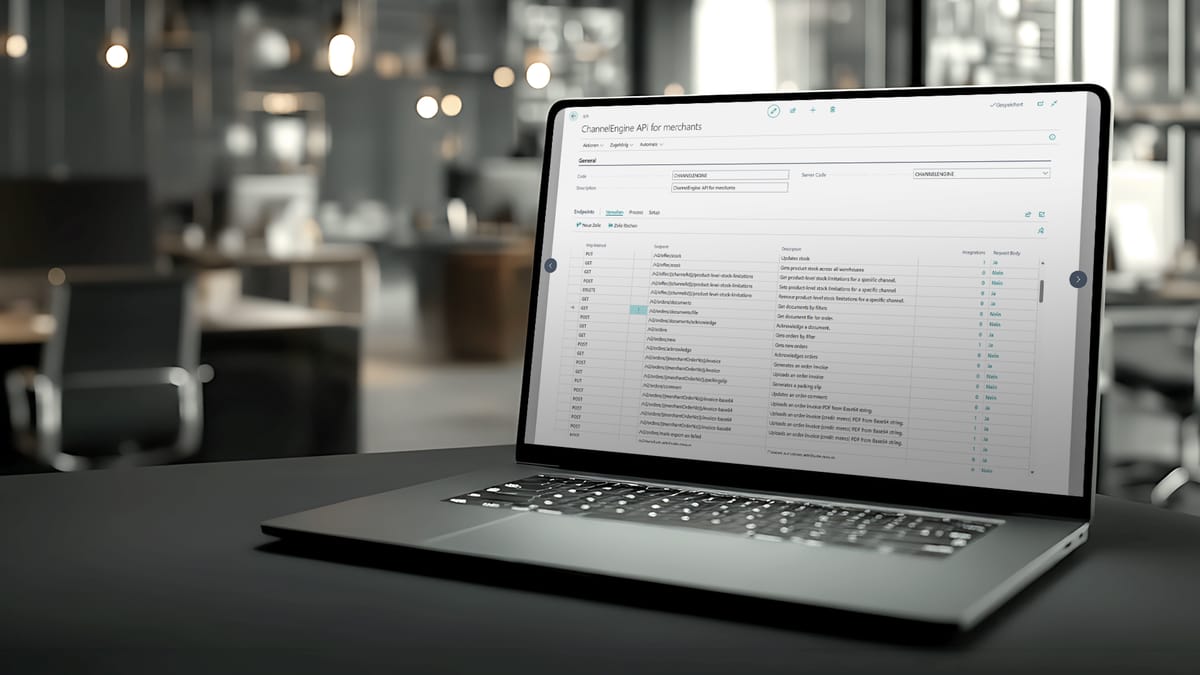
Upload the OpenAPI specification of your upstream system, and dicobis.connect generates endpoints, data models, and sample calls from it. That saves the first 60% of every integration and ensures the interface matches exactly what the third-party system actually delivers.
Transparency in Operations
Monitoring, structured logs, and notifications show at any time which data flows are running, which are waiting, and which are producing errors. You don't have to hear from your customer that an order didn't arrive in Business Central — you know beforehand.
From API to Business Central in Clear Steps
dicobis.connect ensures that data from your store, marketplace, or upstream system arrives cleanly in the Business Central ERP — and can be played back just as cleanly.
Connect or Import the API
You connect your upstream system via REST or upload its OpenAPI specification. dicobis.connect generates the endpoints automatically — authentication, pagination, and rate limits included.
Select Endpoints
You choose which endpoints are actually relevant: orders, items, inventory, shipments, confirmations. No sprawling integration with 40 endpoints nobody uses.
Map Fields
Via drag-and-drop and click, you map source fields to target fields in Business Central. dicobis.connect suggests sensible defaults and detects conflicts (missing required fields, mismatched data types) immediately — not in live operation.
Define Rules and Transformations
You define how values are converted, normalized, or filtered: tax rates, units of measure, status values, customer-specific codes. Complex logic lives centrally in dicobis.connect — not scattered across Power Automate flows or SQL scripts.
Test and Go Live
You test every data flow with real sample data in a sandbox, see in advance what will arrive in Business Central, and only then go live. Rollback is one click — not an emergency call on the weekend.

Stable in Operation, Fast on Errors
Integrations are only worth something if they run reliably over the long term. dicobis.connect makes transparent what is happening, detects problems early, and supports root-cause analysis — before your customers call the service center.

Monitoring at a Glance
A dashboard shows current status, throughput, and error rate for every data flow. You see at once whether all of last night's orders were processed — and which marketplace is currently causing trouble.
Logs and Error Details
Every failed record is fully logged: request, response, mapping step, error message. Your support or IT team answers the question “Why didn't this order arrive?” in minutes instead of hours.
Retries and Queues
Temporary outages (marketplace API down, Business Central in a maintenance window) cause no data loss. Records go into a queue and are retried automatically until they are posted cleanly.
Notifications
You define yourself when dicobis.connect notifies you: above a certain error rate, for specific critical data types (e.g., invoices), or when an endpoint has been idle for more than X minutes. Via email, Microsoft Teams, or webhook.
Roles and Access
You control centrally who can see and change what: business teams may adjust mappings, IT manages connections, external consultants get read-only access. Auditable and traceable at all times.


One Session,
One Clear Decision
A 25-minute session. Together, we look at your most important interfaces, estimate the effort, and tell you whether dicobis.connect is right for you — or not. No pitch deck, no sales pressure.
Book a Session
Numbers That Make Integration Effort Tangible
dicobis.connect significantly shortens interface projects — and makes them predictable. Three numbers that show where the difference comes from.
Standard connectors available
Days of setup instead of weeks
- %
less manual interface work
FAQ
Do you need your own development team for this?
No, not for ongoing operations. Connections, endpoints, mapping, and rules are maintained in the dicobis.connect interface — a job for IT, not a development team. We typically do the initial setup of a new connection together: dicobis brings the technical template, your IT decides on field mapping and rules. If a source is so specific that it needs its own extension, we say so early — but the standard remains that maintenance works without code. Details on our approach can be found on our methodology page.
Which APIs are suitable?
dicobis.connect works exclusively with REST APIs. Providers offering an OpenAPI specification can be connected especially quickly because endpoints are adopted automatically. REST APIs without OpenAPI documentation also work — the endpoints are then created manually. SOAP, CSV push, and XML push are deliberately out of scope: for classic CSV/XML imports, Business Central uses its native import functions.
Does dicobis.connect work with other ERPs?
dicobis.connect focuses on Microsoft Dynamics 365 Business Central. The platform is built for the Business Central world — including the permission model, audit requirements, and monitoring. If you run a different target system, an open conversation is worthwhile: often the underlying question is whether Business Central is the right foundation for the years ahead. That evaluation belongs in the assessment session.
How are errors detected and resolved?
Through three mechanisms: First, every transfer runs through central monitoring — a status traffic light per connection, error rate, last run. Second, dicobis.connect logs every request and response with its mapping path, so you can see per transaction where things got stuck. Third, failed transfers are retried automatically; stuck orders go into a queue for clarification. Critical errors trigger notifications — by email or in Microsoft Teams. That way, the ball lands with the right people early — not only when a customer calls.
Are there ready-made connections for common shop systems and carriers?
Yes — proven connections exist for the typical building blocks of an e-commerce setup: shop systems, marketplaces, fulfillment, carriers, payment, and accounting connections. Which connections come straight from the standard for your setup and which need to be newly built is something we clarify in the assessment session. Typical e-commerce Business Central projects end up with between 15 and 25 interfaces via dicobis.connect.